Multi TV: channels, frequencies, and installation guide

·

Multi TV channels, frequencies and other settings

Multi TV is a free-to-air satellite broadcast service in Ghana. It started a TV revolution in Ghana in July 2009, offering free satellite television to Ghana and over 25 other African countries, most of them in West Africa. Multi TV is operated by the Multimedia Group Limited, a Ghanaian media company founded by Kwasi Twum in 1995, which also runs Joy FM, Adom FM, and several other radio and TV stations.

Multi TV broadcasts from the Astra 2F satellite at 28.2° East. The service is completely free. There are no monthly subscription fees. You only need a satellite dish, a decoder that supports MPEG-4, and a clear line of sight to the satellite.

Multi TV frequency and symbol rate

Multi TV’s primary transponder is 12525 V with a symbol rate of 30000 and FEC 5/6. This carries the main bouquet of TV and radio channels operated by the Multimedia Group under the WAPS (West Africa Platform Services) banner.

A second WAPS transponder at 12605 V carries an additional 30 or more channels, mostly Ghanaian religious and community broadcasters. Both transponders use DVB-S2 with QPSK modulation and MPEG-4/SD video compression.

There are also other broadcasters sharing the same satellite at 28.2° East. The full transponder list is below.

Transponder list for Multi TV and Astra 2F at 28.2° East

ServiceFrequencyPolarisationSymbol rateNotes
Multi TV (WAPS)12525Vertical30000Main bouquet: 32 TV + 24 radio channels
WAPS 212605Vertical30000Additional 33 TV channels, mostly religious and community
WAP TV11595Vertical30000Ghanaian Christian and community channels
SES11635Vertical30000Additional free-to-air channels
SES11675Horizontal30000Additional free-to-air channels
Play TV12565Horizontal30000Nigerian. Premium service with 2 free-to-view channels

For Multi TV specifically, enter frequency 12525, polarisation Vertical, symbol rate 30000. Your receiver should find all the main channels. Then add 12605 V with the same symbol rate to pick up the rest.

Multi TV channels list

The following channels are active on the two WAPS transponders as of February 2026, based on LyngSat satellite data for Astra 2F. Channel numbers and availability may change after broadcaster adjustments, so a periodic rescan is recommended.

TV channels on 12525 V (main bouquet)

ChChannel nameFormat
101Joy PrimeMPEG-4/SD
102Adom TVMPEG-4/SD
103Joy NewsMPEG-4/SD
104Mogpa TV PlusMPEG-4/SD
105Fire TV (Ghana)MPEG-4/SD
106Rock TV (Ghana)MPEG-4/SD
108Sweet TVMPEG-4/SD
109GH Police TVMPEG-4/SD
110Pent TVMPEG-4/SD
111TVTMPEG-4/SD
112Potters City TVMPEG-4/SD
113Woezor TVMPEG-4/HD
114Channel MoEMPEG-4/SD
115Alpha Gnosis TVMPEG-4/SD
116Pan African TVMPEG-4/SD
117Movement TVMPEG-4/SD
118Liberia National TVMPEG-4/HD
119TV3 (Ghana)MPEG-4/SD
120Ghana TVMPEG-4/SD
121Onua TVMPEG-4/SD
122GTV Sports+MPEG-4/SD
123Precious TVMPEG-4/SD
124Royal TV (Ghana)MPEG-4/SD
125OB TVMPEG-4/SD
126Kessben TVMPEG-4/SD
128Elijah TVMPEG-4/HD
129GH One TVMPEG-4/SD
130TV XyzMPEG-4/SD
131Green Gold TVMPEG-4/SD
132ABC News GHMPEG-4/SD

TV channels on 12605 V

ChChannel nameFormat
55700Mothers TVMPEG-4/SD
55701Grace TV (Ghana)MPEG-4/SD
55702Brighter TVMPEG-4/SD
55703Omanba TVMPEG-4/SD
55704Kuma Plus TVMPEG-4/SD
55705Home TV (Ghana)MPEG-4/SD
55706Hope Channel GhanaMPEG-4/SD
55707Fast TVMPEG-4/SD
55708Ghanaman TVMPEG-4/SD
55709Globe TVMPEG-4/SD
55710Northern Gold TVMPEG-4/SD
55711Western Diamond TVMPEG-4/SD
55712King Tom TVMPEG-4/SD
55713Sporty TVMPEG-4/HD
55714THM TVMPEG-4/SD
55715Joy LearningMPEG-4/SD
55716Zion TVMPEG-4/SD
55717Holiness TVMPEG-4/SD
55718Holy TV (Ghana)MPEG-4/SD
55719Roja TVMPEG-4/SD
55720TAC TVMPEG-4/SD
55721Sompa TVMPEG-4/SD
55722Aseda TVMPEG-4/SD
55723Ezra TVMPEG-4/SD
55724Deeper Life TVMPEG-4/SD
55725Days TVMPEG-4/SD
55727Lawson TVMPEG-4/SD
55728Conquer TVMPEG-4/SD
55729Genesis TV (Ghana)MPEG-4/SD
55730Legend TVMPEG-4/SD
55731AS TVMPEG-4/SD
55732Givers TV+MPEG-4/SD

Radio channels on Multi TV

Multi TV carries radio stations on the 12525 V transponder. These are broadcast as audio-only channels and are popular with listeners across Ghana.

ChStationLanguage
201Joy FMEnglish
202Asempa FMAkan
203Luv FMEnglish
204Adom FMAkan
205Hitz FMEnglish
206Nhyira FMAkan
207Peace FMEnglish
209Citi FMEnglish
210Atlantis RadioEnglish
211Kessben FMAkan
212E.L.B.CEnglish
213Sporty FMEnglish
215Angel 96.1 FMEnglish
217New Mercury 91.5 FMEnglish
219Power 97.9 FMEnglish
220Radio LoméFrench
221Radio KaraFrench
222Heaven FMEnglish
223Ahotor FMEnglish
224Radio Gold 90.5English

Coverage

Multi TV’s West Africa beam covers much of the continent. The following countries fall within the satellite footprint, though viewers further from the beam centre will need a larger dish for reliable reception.
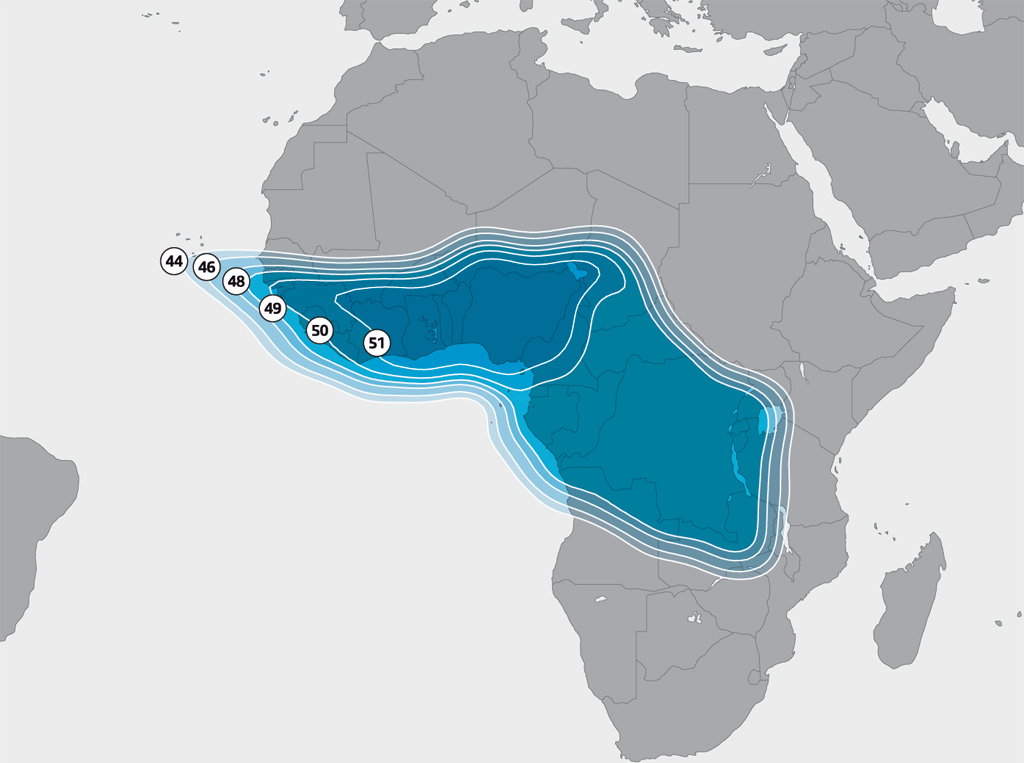
Astra 2F West Africa Ku-band beam coverage map, showing signal reaching from Senegal to parts of Mozambique.
Multi TV broadcasts from the Astra 2F satellite. Its West Africa beam covers from Senegal to parts of Mozambique and Zimbabwe.
  • Ghana (full coverage)
  • Nigeria
  • Togo
  • Benin
  • Cote d’Ivoire
  • Liberia
  • Sierra Leone
  • Guinea
  • Guinea-Bissau
  • The Gambia
  • Senegal
  • Mali
  • Niger
  • Chad
  • Cameroon
  • Gabon
  • Equatorial Guinea
  • Sao Tome and Principe
  • Central African Republic
  • Democratic Republic of Congo
  • Angola
  • Zambia
  • Zimbabwe
  • Malawi
  • Mozambique
  • Tanzania
  • Kenya
  • Uganda

In Ghana, a 60 cm dish is sufficient for a strong signal. In Nigeria and countries further from the beam centre, a 90 cm dish is recommended. In fringe areas like Kenya, Zambia, and Mozambique, you may need a 120 cm dish or larger.

How to install Multi TV

You need three things: a satellite dish, a universal Ku-band LNB, and an MPEG-4 capable satellite receiver (decoder). Multi TV does not require a proprietary decoder. Any free-to-air receiver that supports DVB-S2 and MPEG-4 will work.

Equipment

  • Satellite dish: 60 cm in Ghana, 90 cm in Nigeria
  • Universal Ku-band LNB (set to 9750/10600)
  • DVB-S2 MPEG-4 satellite receiver with blind scan
  • Coaxial cable and F-type connectors
  • A satellite signal finder is helpful but not essential

Complete dish and decoder kits are sold in Ghana on Jumia and at electronics markets like Kantamanto in Accra. Prices range from GH₵ 630 to GH₵ 700 for a full kit including dish, combo decoder, LNB, remote, and cable. These combo decoders support both DVB-T2 (terrestrial) and DVB-S2 (satellite), are MPEG-4 Full HD 1080p capable, and can store up to 5,000 channels.

Dish alignment

Point your dish towards 28.2° East. In Accra, this is roughly south-southeast at an azimuth of about 195° and an elevation of 45 to 50°. Use your receiver’s signal strength meter or a satellite finder to peak the signal. Tune to 12525 V 30000 to confirm you are on the correct satellite.

Scanning for channels

  1. Go to the installation menu on your receiver
  2. Select Astra 2F at 28.2° East (some receivers list this as Astra 2A/2B/2F)
  3. Enter the transponder: Frequency 12525, Polarisation V, Symbol Rate 30000
  4. Run a blind scan or network search
  5. The receiver should find 30 or more TV channels and 20 radio stations
  6. Add a second transponder at 12605 V 30000 and scan again for the remaining channels

If you have trouble, check that your LNB type is set to Universal and that your coaxial cable connections are tight. Rain fade (temporary signal loss during heavy rain) is normal with Ku-band satellite TV and will clear once the rain passes.

How to re-scan Multi TV for new channels

Channels are added and removed periodically. To pick up new channels without changing any frequency settings:

  1. Press Menu on your remote control
  2. Select Installation
  3. Select Install Satellite and press OK
  4. Press the green button on the remote control
  5. The decoder will scan automatically and find all available channels

This procedure works on the standard Multi TV digibox. On other receivers, look for “Auto Scan” or “Blind Scan” in the installation menu.

How to install Multi TV in Lagos Nigeria

Multi TV is not licensed to operate in Nigeria by the NBC or NCC. Its satellite signal simply happens to cover much of West Africa. You will not find many Multi TV branded decoders on sale in Nigeria, except for a few that individuals bring in from Ghana.

However, you do not need a Multi TV branded decoder. Any 60 cm or 90 cm satellite dish will work. The brand on the dish is just a label. Pair it with any satellite receiver that supports MPEG-4 (most recent Strong receivers qualify). Point the dish at 28.2° East, enter the frequency 12525 V 30000, and scan.

In Lagos, satellite dishes and receivers are widely available at Computer Village in Ikeja and from online retailers. A 90 cm dish is recommended in Nigeria for a more stable signal.

Frequently asked questions

What is the latest Multi TV frequency?

The primary frequency is 12525 V with a symbol rate of 30000 and FEC 5/6 on Astra 2F at 28.2° East. A second transponder at 12605 V 30000 carries additional channels.

How many channels are on Multi TV?

As of February 2026, Multi TV carries over 60 TV channels and 20 radio stations across its two WAPS transponders (12525 V and 12605 V). Additional channels from other broadcasters on the same satellite can be found by scanning the other transponders listed above.

Is Multi TV available in Nigeria?

Yes. Multi TV’s satellite signal covers Nigeria. Use a 90 cm dish pointed at 28.2° East with any MPEG-4 DVB-S2 receiver. The frequencies are the same as in Ghana.

Is UTV available on Multi TV?

United Television (UTV) by the Despite Group is not available on Multi TV. It is available on DStv Channel 360 in Ghana. You can also access UTV for free on the Badr 7, SES 4, and SES 5 satellites.

How do I fix no signal on Multi TV?

Check your dish alignment, make sure the LNB cable is securely connected, and verify that the receiver is set to the correct frequency (12525 V 30000). If the problem started suddenly, it may be rain fade, which clears once the weather improves. If it persists, re-align your dish or have an installer check the LNB.

Oluniyi D. Ajao Avatar

Comments

  1. fatou s khan Avatar
    fatou s khan

    pls I leave in the gambia am using MULTI TV CHANNEHS and my STRONG DECODER (SRT 4669) REMOTE CONTROL is spoil, how can i get one? and how much does it cost? pls help.

  2. Matthew A Avatar

    plz i want a software dat open tv3 on bove multi tv and strong decorders

  3. Issaka Avatar

    can i track mytv and infinity tv in northern ghana? and how? thanks

  4. laala Avatar

    Hi

    Is there a way to find out in which countries I can get the multi tv signal? I travel all over the world a lot and would like to know where I can watch multi tv where possible.
    Perhaps there is a website that lists all the countries.
    thamks

  5. Lawrence Avatar

    Please, how can I upgrade my SRT4669Z STRONG DECODER in order to get more channels? I need help.

  6. chaali0 Avatar

    how can i use strong decoder to catch xxx stations

  7. nana amankwa Avatar
    nana amankwa

    Am using the “quality” type of multi, how can I add tv3 and othere channels.

  8. Peter Avatar

    please not all the multi tv decoders are have the edit satellite at the installation of the menu. What should we do?

  9. kuvalah abaefaa john Avatar
    kuvalah abaefaa john

    my multi tv Ca plus series 2 (DV 2) by syndicated capital,has a problem and i need solutions.i was trying to upgrade it and lights went out because of that it works no more,it only display(locking TP) after that it display(connecting data time out)last it display (receiving error )noting comes again on the sreen

  10. patrick Avatar

    i was trying to upgrade my somotex decoder(mtv9800j) unfortunate for me i deleted the programme, how can i get it back.pls thanks

  11. CHRISTIAN OBENG Avatar
    CHRISTIAN OBENG

    I tried it but it didn’t work. The quality signal was red instead of blue. Pls kindly help me.

  12. ganabahjoe Avatar
    ganabahjoe

    Please what does mytv mean and what are its benefits?

  13. musah ubaida Avatar
    musah ubaida

    Pls how can I be a multi TV distributor. N what are de necessary procedure

  14. saviour Avatar

    My multi TV the pictures are not coming l don’t know what to do…

  15. Tabuoronombo Avatar
    Tabuoronombo

    How can I add the French channels to my multi TV decoder

  16. shadrack Avatar

    Thanx 4 d wonderful work,can U add stations lyk metro tv in ghana to your multi tv cos ive their biss keys

  17. Isaac Anderson Avatar
    Isaac Anderson

    I lost joy tv how do I get it back?

  18. Setornam Avatar

    I have KKTV digital box (decoder). How can I set it to receive Multi TV channels? Someone tried it but when decoder is switched off and back on, the signal strength goes to 17 and quality goes to 0. After this, even if it’s re-scanned nothing comes. How do I set it such that when it’s switched on after putting it off the channels will still be active?

    Please assist me.

  19. Israel Avatar

    pls, no station is showing on my decoder. what’s going? kindly help

  20. abokootum elizabeth Avatar
    abokootum elizabeth

    Hello tanks for dis lecture,is gud for the installers and multi tv users alike.but can u install 2disc to one decoder?if yes enlighten me on de process.

  21. Boateng Patrick Avatar
    Boateng Patrick

    We thank you for your good programs,but you said we can add 10 more TV and radio channels, but the symbols rate is four digit what I know is five.

  22. Jemy Avatar

    Does anyone know how to record with multitv?

  23. Eyram Avatar

    please multi tv and strong decoder which on do u think is the best…
    i planed accquiring one this week….need your opinion…thanks

  24. ida najat Avatar

    I added another LLB to an existing one and my tv has since been going off and on. Please could it be the additional LLB?

  25. Jeffery Frimpong Avatar
    Jeffery Frimpong

    How can you watch multi tv in the UK especially 4kids tv

  26. Samuel Nketiah Avatar

    Astra2b is not on my decoder

  27. George Andoh Baidoe Avatar
    George Andoh Baidoe

    My signals are off after the upgrading what should I do?

  28. Godfred Kofi Nyamekye Avatar

    Big Boss please I need to upgrade my Satellite Decoder by myself can you teach me hw to do it? Thank you.

  29. Ruth Adeke Avatar
    Ruth Adeke

    Goodmorning, most of my multi tv channels went off since last week wenesday, wot do i Do? Thanks

  30. Halila Avatar

    I want to dowoad it on my phone.how do i download it

    1. Danny Avatar

      please is it possible to use your multi tv decoder as a modem to browse on the net??

  31. nana kyei Avatar

    How can I swap my old decoder for a new n for how much in kumasi

  32. addo Avatar

    I want to know how to do the Ghana multi installation, somebody should pls help with the procedure

  33. Mensah Avatar

    I live in abidjan, CAN i use multi tv in Abidjan ?

  34. Eric Avatar

    I try it but it did not worked

  35. Michel Yao Adokou Avatar
    Michel Yao Adokou

    Apart from dish signal, I want to get free air signal from my normal antenna. I have the input but I. Don’t know how it works. Free air signal is now richer than multi tv signal.

  36. Gyimah Richard Yeboah Avatar
    Gyimah Richard Yeboah

    plz l want to get utv and sports plus on my srt 7669d strong coder

  37. Kweku Avatar

    My decoder is sc 10152 and my son pressed restore factory settings… now i lost all chanels what do i do to get the back.. all i have seen on the net is not working because they are meant for the new sets

  38. JOHN JOEJO A. GBAFAH Avatar
    JOHN JOEJO A. GBAFAH

    MY MULTI TV DECODER IS STRONG SRT 4330. HELP ME ADD MORE CHANNELS ON MY STRONG SRT 4330 MULTI TV

  39. JOHN JOEJO A. GBAFAH Avatar
    JOHN JOEJO A. GBAFAH

    MY DECODER IS STRONG 4330 . HELP ME ADD MORE CHANNELS ONTO MY STRONG MULTI TV .IA JOEJO FROM NKORANZA B/A.

  40. Abiba Yakubu Avatar
    Abiba Yakubu

    Plz I want to knw the new settings for the multi TV quality DV3 decoder . Mine is not working. All the multi TV channels are gone.

    1. Abiba Yakubu Avatar
      Abiba Yakubu

      Plz am around Mallam atta market

  41. Dish Tv Avatar

    Thanks Oluniyi for sharing informative article! I followed your instruction but Channel Z not working. Please help

  42. David k.k Dickson Avatar
    David k.k Dickson

    Am in stalker of decoders I want to know when is this going to end or is a permanent thing you guys has done

  43. Sat Installer Avatar
    Sat Installer

    That service sounds like FTA service here in the US. Their business model is all advertising, they don’t charge customers anything to subscribe… Interesting.

  44. onyemachi Joseph Avatar
    onyemachi Joseph

    I so much love your services, pls can you mail me contact number & address of multi TV in gahan. Thank you.

  45. Emmanuel adjei Avatar
    Emmanuel adjei

    why my multi TV face rolling all the time

  46. Vivian Avatar

    In sunyani in the Brong/Ahafo region has experienced no signal since Saturday night till now so please work on it for us.

  47. RK KARN Avatar

    How can i see the indian channel in Hindi language at ghana on Multi TV HD II.

  48. Monica Avatar

    The multi TV I bought has quality written on it but I don’t like the channels on it, they are different from multi TV channels but they told me its from multi TV

  49. adicommunications ltd Avatar
    adicommunications ltd

    Do you sometimes feel that you would like to watch ITV channels being broadcast to other areas of the UK?

    Fed up with Gaelic programs and can’t follow the subtitles?
    Want to check the local news in Yorkshire, Northern Ireland, or elsewhere.
    Get the local Sport and other programmes?
    Occasionally see ‘Corrie’ at a different time?
    IF YOU FIND ERRORS or wish to advise changes to the contents of this page please send email..

    Updated on date at foot of page.

    You need a digital satellite system which uses a SKY Digibox you can probably add many extra ITV channels. It depends what you equipment you have and I cannot guarantee it will work for you. If you already pay a SKY subscription then it should work. Originally I paid a SKY subscription but now I have an old Sky Free-to-view Card (NOT Freeview!) from the time when such was available. Since the BBC no longer required this card to be used to access their channels the card has ceased to be officially used but mine is still in the box. I suspect it still must contain some regional information as SKY EPG channels 101 and 102 are BBC-TV 1 and BBC-TV 2 respectively. Without any card all BBC 1 – 2 channels are from EPG 941 onwards. You likely already know that all these can be viewed with no card or the process described below.

    Sky now provide ‘FREESAT’ which is either all the kit AND viewing card (around £170.00), or if you have the kit only £20.00 for the card. Nearly all the channels available with the card are already available FTA but the EPG operates properly.

    ALL BBC Channels for ALL regions are available to Digibox users with no payment or extra equipment.

    Sometimes the local ITV-1 station appears as EPG 103, but most times it does not. In such cases the procedure detailed below provides access to these all ITV 1 regional variation channels.

    Other ITV channels and C4. etc may appear in the EPG but are encrypted.

    Have a look at Satellite TV Magazines you can “ADD EXTRA CHANNELS” to view with your SKY Digibox using settings you can find there, but very limited – sport and music is the same in any language :^)

    You may still be able to see some channels, the unnamed ones.)

    Here’s how – it’s easy!

    Use your SKY remote control, pointing it at your Digibox, to carry out the following stages.

    1. Press the green SERVICES button

    2. Press the number 4 button (SYSTEM SETUP)

    3. Press the number 4 button again (ADD CHANNELS)

    5. You will see a grid something like this with the default entries as shown-

    Frequency (GHz) 11.778
    Polarisation V
    Symbol Rate (Mbaud) 27.5
    FEC 2/3
    Find Channels
    6. For the free extra channels available you need to enter the appropriate numbers or change the entries as shown in the grid above.

    The top line will already be highlighted in yellow, simply type the numbers (as below) on your remote keypad (ignore the point).

    Use the green down-arrow to move to the next line – now move either L or R green arrow to change V to H.

    Move down to next line and use the L or R green arrow to change 27.5 to 22.0

    Again, move down and use the L or R green arrow to change FEC from 2/3 to 5/6

    Move down to the next line ‘Find Channels’, press your SELECT button and wait a few moments.

    7. A list of available channels will be displayed and you simply follow the onscreen instructions – press the yellow key, move down, yellow key again, move down, etc. until all the channels (you will recognise at least some of the names) are marked with a ‘tick’.

    Now press your SELECT button to save the channels.

    Frequency (GHz) 10.832
    Polarisation H
    Symbol Rate (Mbaud) 22.0
    FEC 5/6
    Find Channels
    8a. At THIS STAGE repeat items 6 and 7 again for the following Frequency.

    Frequency (GHz) 10.891
    Polarisation H
    Symbol Rate (Mbaud) 22.0
    FEC 5/6
    Find Channels
    8b. Again, repeat items 6 and 7 again BUT you will need to change the Frequency AND the Polarity to V for the following.

    Frequency (GHz) 10.906
    Polarisation V
    Symbol Rate (Mbaud) 22.0
    FEC 5/6
    Find Channels
    8c. and yet again, repeat items 6 and 7 again BUT change the Frequency AND the Polarity.

    (Detail kindly supplied by Alan in February 2006.)

    Frequency (GHz) 10.722
    Polarisation H
    Symbol Rate (Mbaud) 22.0
    FEC 5/6
    Find Channels

    Frequency (GHz) 10.758
    Polarisation V
    Symbol Rate (Mbaud) 22.0
    FEC 5/6
    Find Channels
    Follow onscreen instructions to exit. (The default settings will appear if you start the process again from scratch.)

    To gain access to these channels –

    1. Press the green SERVICES button

    2. Press the number 6 button (Other Channels)

    Scroll through the available list and SELECT the channel you wish.

    It is also possible to add more channels if you select the data from the satellite operators websites – Hotbird and Astra at about 22 degrees East.

    These are likely to be Polish TV and Radio channels..

    Are you aware of FREEVIEW? FREE-TO-AIR TV and RADIO channels in the UK from your existing (good reception) aerial.

    Read HERE about an INSTALLATION FAULT for the Freecom DVB-T USB2 stick
    http://adicommunications.co.uk

  50. David Ian Avatar

    Thank you for sharing this information. It is very nice information about how to set tv and radio antenna.

Leave a Reply

This site uses Akismet to reduce spam. Learn how your comment data is processed.


Related articles